
UX/UI design principles for creating user-friendly experiences

UX/UI design principles

UX/UI design principles lay the foundation for crafting compelling user experiences that resonate with audiences. In today’s digital landscape, understanding the interplay of aesthetics and functionality is crucial for designers aiming to engage users effectively. By embracing user-centered design approaches, we can create interfaces that not only look great but also enhance usability, making every interaction meaningful and enjoyable.

This exploration of UX/UI design principles delves into the core concepts shaping the industry. We’ll discover how to implement effective strategies that boost user engagement, as well as integrate these principles with marketing techniques to maximize impact. From conducting user research to developing wireframes, this journey will illuminate the steps necessary for successful design that meets both user needs and business goals.

Understanding UX/UI Design Principles

User experience (UX) and user interface (UI) design are two interrelated disciplines that focus on creating products that are not only functional but also enjoyable and engaging for users. Understanding the fundamental concepts of these areas is essential for anyone involved in the design process. This knowledge forms the backbone of developing products that meet users’ needs effectively while providing an aesthetically pleasing interaction.UX design revolves around enhancing user satisfaction by improving usability, accessibility, and pleasure in the interaction between the user and the product.

UI design, on the other hand, pertains to the look and feel of the product, encompassing the layout, visual elements, and overall aesthetic. Together, these principles guide designers in creating intuitive and attractive products.

Importance of User-Centered Design Approaches

User-centered design (UCD) focuses on involving the user throughout the design process, ensuring that the final product aligns with their needs and preferences. This approach is critical for several reasons:

  • Enhanced Usability: Products designed with user input are easier to navigate and use, which leads to higher satisfaction rates.
  • Reduced Development Costs: By identifying user needs early in the design phase, teams can avoid costly revisions later in the project lifecycle.
  • Increased User Engagement: When users feel their needs are being addressed, they are more likely to engage with the product and remain loyal to the brand.
  • Competitive Advantage: UCD can differentiate a product in a crowded market, offering unique solutions that resonate with users.

Interaction Between Aesthetics and Usability

The relationship between aesthetics and usability is a critical area of focus in UX/UI design. While usability ensures that users can accomplish their tasks effectively, aesthetics influences the user’s emotional response and overall experience. Striking a balance between these two aspects can significantly impact a product’s success.The following points illustrate the importance of this interaction:

  • Visual Hierarchy: Effective use of design elements such as size, color, and spacing guides users’ attention to essential features and actions.
  • Emotional Connection: A visually appealing interface can evoke positive feelings, increasing users’ willingness to interact with the product.
  • Brand Identity: Consistent aesthetics reinforce brand recognition and trust, fostering a deeper connection with users.
  • First Impressions: Research shows that users often form opinions about a product within seconds based on its visual design, making aesthetics crucial for initial engagement.

“Good design is as little design as possible.” – Dieter Rams

By understanding and applying these UX/UI design principles, designers can create products that not only serve functional purposes but also deliver exceptional experiences that resonate with users on a deeper level.

Implementing Effective UX/UI Strategies

UX/UI design principles

When it comes to enhancing user experience and interface design, employing effective strategies is essential for maximizing user engagement. By focusing on user needs and preferences, designers can create attractive and functional interfaces that resonate with their audience. This section dives into key approaches to improve user interactions, conduct user research, and develop wireframes and prototypes for testing ideas.

Improving User Engagement Through Design

Understanding how design influences user engagement is critical for any UX/UI project. Effective strategies can greatly increase user satisfaction and retention. Below are some key strategies to consider:

  • Consistency: Maintain uniformity in design elements such as colors, fonts, and layouts to help users navigate with ease.
  • Visual Hierarchy: Organize information in a way that guides users’ attention to the most important elements first.
  • Feedback Mechanisms: Provide users with immediate feedback when they perform actions, helping them understand the impact of their interactions.
  • Accessibility: Ensure that your design is usable by individuals with disabilities to broaden your audience reach.
  • Minimalism: Avoid clutter by utilizing whitespace effectively, allowing users to focus on key content without distractions.

User Research and Usability Testing Methods

Conducting user research and usability testing is vital for gathering insights and validating design decisions. This process helps identify user pain points and preferences. Here are several methods to consider:

  • Surveys and Questionnaires: Use these tools to gather quantitative data regarding user preferences and behavior.
  • User Interviews: Conduct one-on-one discussions to delve deeper into user needs and experiences.
  • Focus Groups: Engage groups of users to collect diverse insights on design concepts and usability.
  • A/B Testing: Compare two versions of a design to determine which one performs better in real-world scenarios.
  • Heuristic Evaluation: Assess your design against established usability principles to identify potential issues.

Creating Wireframes and Prototypes

Wireframes and prototypes are crucial tools in the UX/UI design process. They allow designers to visualize ideas and gather feedback before final implementation. Here’s a look at the process for creating effective wireframes and prototypes:

  • Define User Flows: Map out the steps users will take to complete tasks, ensuring a streamlined experience.
  • Sketch Initial Concepts: Create low-fidelity wireframes by hand or using software to Artikel the basic layout and functionality.
  • Add Detail Gradually: Transition to high-fidelity wireframes by adding design elements and interactivity.
  • Utilize Prototyping Tools: Use software like Figma, Sketch, or Adobe XD to build clickable prototypes that simulate the final product.
  • Conduct User Testing: Gather feedback on the wireframes and prototypes to identify areas for improvement before moving to the final design.

Integrating UX/UI Design with Marketing Techniques

In today’s digital landscape, the integration of UX/UI design with marketing techniques is not just beneficial—it’s essential. A well-crafted user experience and interface can significantly boost the effectiveness of marketing efforts, leading to increased engagement, conversions, and customer loyalty. Understanding how these elements work together can provide businesses with a competitive edge.

Role of UX/UI Design in Enhancing Search Engine Marketing Efforts

The synergy between UX/UI design and search engine marketing (SEM) is critical for optimizing online visibility and user engagement. A well-structured website design improves user experience, which in turn can enhance a site’s ranking on search engines due to lower bounce rates and increased time on site.

Website Speed

Fast-loading pages enhance user experience and are a ranking factor for search engines. For instance, Google considers page speed as a crucial metric, impacting both rankings and user satisfaction.

Mobile Responsiveness

With the rise of mobile users, responsive design ensures that websites function well on various devices, improving user engagement and search ranking.

Clear Navigation

Intuitive navigation helps users find what they need quickly, reducing frustration and encouraging them to interact more with the site, which is beneficial for SEM performance.

“A seamless user experience can enhance engagement metrics, which search engines use to evaluate site quality.”

Influence of Web Design on Social Media Marketing Campaigns

The design of a website can significantly impact the effectiveness of social media marketing campaigns. A visually appealing and user-friendly website can drive users from social media platforms to the site more effectively, fostering higher conversion rates.

Visual Consistency

Maintaining a consistent design across social media and the website reinforces brand recognition, making users more likely to engage with your content.

Call-to-Action Buttons

Strategically placed and well-designed CTAs can lead to higher click-through rates from social media posts to the website.

Shareable Content

A well-designed layout encourages users to share content from your site on social media, increasing organic reach and visibility.

Best Practices for Video Marketing Through UI Design

Video marketing has emerged as a powerful tool in digital marketing strategies, and effective UI design can enhance its impact. A well-structured video interface can improve user interaction and viewing enjoyment.

Engaging Thumbnails

Thumbnails that are visually appealing and aligned with the brand can draw users in. For example, vibrant colors and clear text can capture attention more effectively.

Easy Navigation

Ensure viewers can easily access related videos or content through clear UI elements. Implementing ‘next video’ buttons can keep viewers engaged on the platform longer.

Responsive Design

Videos should be designed to look good on all devices. This can improve user experience and lead to higher retention rates.

“Effective UI design can transform a simple video into an engaging storytelling experience, enhancing viewer retention and interaction.”

Outcome Summary

UX/UI design principles

In conclusion, mastering UX/UI design principles is more than just applying techniques; it’s about understanding users and crafting experiences that resonate. As we integrate these strategies with marketing efforts, the potential for creating impactful interactions grows exponentially. Whether you’re a seasoned designer or just starting, embracing these principles will ensure your work stands out in a crowded digital space, ultimately leading to greater user satisfaction and engagement.

Answers to Common Questions

What is the difference between UX and UI?

UX refers to user experience, focusing on the overall feel and ease of use of a product, while UI refers to user interface, which deals with the specific visual design elements.

Why is user-centered design important?

User-centered design is critical because it prioritizes the needs and preferences of users, leading to products that are more intuitive and enjoyable to use.

How can I improve my UX/UI design skills?

You can enhance your skills by practicing design principles, conducting usability tests, seeking feedback, and staying updated on industry trends.

What role does research play in UX/UI design?

Research is fundamental in UX/UI design as it helps designers understand user needs, behaviors, and pain points, informing better design decisions.

How often should I conduct usability testing?

Usability testing should be conducted regularly throughout the design process, especially after significant changes or before launching a new product.
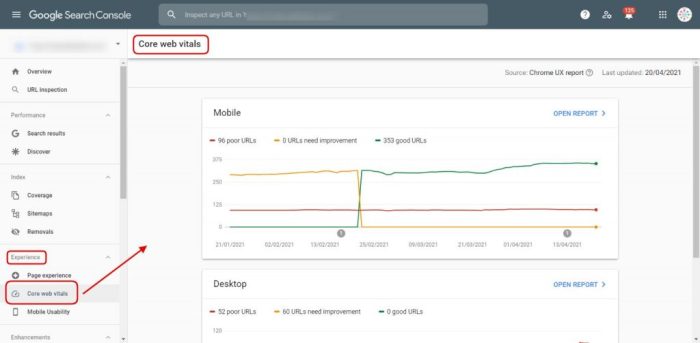
Core Web Vitals optimization guide for better performance

Core Web Vitals optimization guide

As the Core Web Vitals optimization guide takes center stage, this opening passage beckons readers into a world crafted with valuable insights, ensuring a reading experience that is both absorbing and distinctly original.

Core Web Vitals encompass essential metrics that determine the user experience on your website. Understanding how these metrics—Largest Contentful Paint, First Input Delay, and Cumulative Layout Shift—affect site performance is crucial for digital success. This guide will illuminate actionable strategies for optimizing these metrics, ultimately leading to improved engagement and satisfaction for visitors.

Understanding Core Web Vitals

Core Web Vitals optimization guide

Core Web Vitals are essential metrics that Google uses to assess the overall user experience of a website. These metrics focus on three key performance indicators: Largest Contentful Paint (LCP), First Input Delay (FID), and Cumulative Layout Shift (CLS). By understanding and optimizing these factors, website owners can significantly enhance user satisfaction and site performance.The three key metrics have distinct roles in determining how users experience a web page.

LCP measures loading performance, FID gauges interactivity, and CLS evaluates visual stability. Each of these metrics has a direct impact on user engagement and retention. A website that loads slowly, is unresponsive, or shifts unexpectedly can frustrate users, leading to higher bounce rates and diminished conversions.

Largest Contentful Paint (LCP)

Largest Contentful Paint is a crucial metric that measures the time it takes for the largest visible content element on the page to load. This typically includes images, videos, or any substantial text block. A fast LCP enhances the perception of speed and efficiency, which is vital for user satisfaction. For example, when an online store’s main product image takes too long to load, users may choose to leave the site out of frustration, impacting sales.

Optimizing LCP can involve strategies such as:

  • Optimizing images for size and format to ensure quicker loading times.
  • Leveraging browser caching to serve previously requested content faster.
  • Minifying CSS and JavaScript to eliminate unnecessary code that might slow down rendering.

First Input Delay (FID)

First Input Delay measures the time it takes for a user to interact with a page and see a response. This interaction could be clicking a button, tapping a link, or using any actionable element on a page. A low FID is critical as it indicates a smooth and responsive user experience.For instance, if a user clicks on a “Buy Now” button and the website takes several seconds to respond, the user may feel that the website is lagging or broken, leading to frustration.

Strategies to improve FID include:

  • Reducing JavaScript execution time to ensure quicker responses to user actions.
  • Deferring non-essential scripts so that they do not block the main thread.
  • Using web workers to handle background tasks without interfering with the user’s interaction.

Cumulative Layout Shift (CLS)

Cumulative Layout Shift is a metric that quantifies the visual stability of a webpage. It measures how much the page layout shifts during loading, which can lead to a disorienting experience for users. A high CLS score indicates that elements on the page are moving around, which can impact usability and readability.For example, if a user is about to click on a link and the page shifts, it could lead them to click on an unintended element, resulting in frustration or navigation errors.

To reduce CLS, consider the following methods:

  • Always include dimensions for images and video elements to reserve space before they load.
  • Avoid inserting new content above existing content unless it is in response to user interaction.
  • Use CSS aspects to maintain layout stability during dynamic content loading.

Tools for Measuring Core Web Vitals

To effectively measure and analyze Core Web Vitals, several tools are available that provide insights into how your site performs. Each tool can help identify areas needing improvement and track performance over time. Some of the most popular tools include:

  • Google PageSpeed Insights: Analyzes a webpage and provides specific suggestions for improving LCP, FID, and CLS.
  • Google Lighthouse: An open-source tool that audits site performance, accessibility, and , giving detailed reports on Core Web Vitals.
  • Web Vitals Chrome Extension: A simple tool that provides real-time feedback on Core Web Vitals as users interact with your site.

By utilizing these tools, webmasters can gain visibility into their website’s performance and make informed decisions to enhance user experience based on hard data.

Strategies for Optimization

To enhance your website’s performance, focusing on the three key metrics of Core Web Vitals is essential. Implementing effective strategies to improve Largest Contentful Paint (LCP), First Input Delay (FID), and Cumulative Layout Shift (CLS) can significantly enhance user experience and search rankings. Below are actionable steps and best practices designed to optimize these vital components.

Improving Largest Contentful Paint

Largest Contentful Paint measures the loading performance of a webpage, specifically how long it takes for the largest visible content element to render. Reducing LCP is crucial for providing a fast and efficient user experience. Here are some actionable steps:

  • Optimize Images: Compress and serve images in next-gen formats (like WebP) to reduce their size without sacrificing quality. Utilize responsive images to ensure they load correctly on various devices.
  • Implement Lazy Loading: Prioritize loading above-the-fold content first. Use lazy loading for images and videos further down the page, which helps decrease initial load times.
  • Minimize Server Response Times: Use a reliable hosting service and optimize your back-end processes. Consider using a Content Delivery Network (CDN) to reduce latency by serving content closer to users.
  • Reduce JavaScript and CSS Blocking: Defer loading non-critical JavaScript and CSS files to prioritize essential content rendering. This helps to minimize delays in displaying the main content.

Reducing First Input Delay

First Input Delay measures the time it takes for a user to interact with a page (such as clicking a button) and receiving a response from the browser. A low FID is vital for an optimal user experience. Here’s a list of best practices to reduce FID:

  • Minimize JavaScript Execution: Optimize and reduce the size of JavaScript files to allow for faster execution. Use code-splitting to load only the necessary scripts for each page.
  • Reduce Main Thread Work: Limit tasks that block the main thread, such as heavy computations or excessive DOM manipulations. Utilize web workers for offloading intensive tasks.
  • Preload Key Resources: Use ` ` for important scripts and fonts to ensure they are loaded earlier in the process, improving responsiveness when users interact.

Minimizing Cumulative Layout Shift

Cumulative Layout Shift measures the visual stability of a webpage, indicating how often content shifts during loading. Minimizing CLS is essential for maintaining a smooth and predictable user experience. The following techniques can help achieve this:

  • Specify Size for Images and Videos: Always define width and height attributes for images and videos to reserve space before they load, preventing shifts as content appears.
  • Include Dimension Attributes for Ads: If you display ads, ensure they have defined dimensions to prevent layout shifts when they load.
  • Avoid Inserting Content Above Existing Content: Maintain the order of content. If new content is added, place it below the existing content to minimize unexpected shifts.
  • Use CSS for Layout Shifts: Employ CSS properties like `min-height` for containers that may have dynamic content, ensuring consistent spacing during loads.

Related Concepts in Digital Marketing

In today’s digital landscape, understanding Core Web Vitals is essential not just for enhancing user experience, but also for effectively driving business goals. These metrics are intrinsically linked to broader digital marketing strategies, particularly in relation to search engine marketing (SEM), trends, and social media engagement. Recognizing these connections can help businesses optimize their online presence holistically.

Core Web Vitals and Search Engine Marketing

Core Web Vitals have a direct impact on search engine marketing efforts. These metrics – Largest Contentful Paint (LCP), First Input Delay (FID), and Cumulative Layout Shift (CLS) – measure crucial aspects of user experience. Google has made it clear that these factors play a vital role in search rankings. Advertisers must ensure that their landing pages not only convert well but also meet the performance standards set by these metrics.

“Websites that prioritize user experience are more likely to achieve higher ad quality scores, leading to better placement and lower costs per click.”

An efficient SEM strategy benefits greatly from improved Core Web Vitals. By lowering bounce rates and increasing user satisfaction, businesses can expect better return on investment (ROI) from their advertising spend.

Influence of Internet and Trends on Core Web Vitals Performance

Continuously evolving Internet and trends have a significant impact on how Core Web Vitals are perceived and implemented. For instance, with the rise of mobile-first indexing, sites that are not optimized for mobile devices will struggle with performance scores. As users have shifted towards a preference for faster, more responsive websites, search engines have adjusted their algorithms to reward sites that excel in Core Web Vitals.

The following points illustrate how these trends shape performance:

  • Increasing emphasis on mobile optimization, leading to higher expectations for load speeds.
  • Adoption of progressive web apps (PWAs) that inherently improve user experience.
  • Growth in video content, which requires careful management to avoid negatively impacting loading times and CLS.

Companies that stay ahead of these trends can ensure compliance with Core Web Vitals, thus maintaining favorable search engine rankings.

Impact of Social Media and Networking on User Engagement Metrics

Social media platforms play a critical role in driving traffic to websites, making it essential for businesses to optimize their Core Web Vitals. Effective social media campaigns can significantly affect user engagement metrics such as click-through rates and average session durations.When users find a website through social media links, their initial impressions are often influenced by the page’s loading speed and visual stability.

A seamless experience can lead to higher engagement and sharing rates.

“Effective social media strategies hinge on the website’s ability to provide an engaging and fast user experience.”

The following aspects showcase the interplay between social media and Core Web Vitals:

  • Social media traffic often leads to diverse visitor profiles, necessitating adaptable website performance.
  • High engagement on social media can enhance direct traffic to sites, improving overall performance metrics.
  • Negative feedback on social media regarding slow websites can harm brand reputation and reduce traffic.

By prioritizing Core Web Vitals, businesses can maximize user engagement from social media referrals, ultimately leading to better overall performance in their digital marketing initiatives.

Epilogue

Core Web Vitals optimization guide

In conclusion, mastering Core Web Vitals is more than just a technical requirement; it’s a gateway to enhancing user experience and boosting your site’s visibility in search rankings. By implementing the strategies Artikeld in this guide, you’ll be well-equipped to create a smoother, faster, and more engaging online environment for your audience.

FAQ Overview

What are Core Web Vitals?

Core Web Vitals are a set of three important metrics that measure the user experience on a website, specifically focusing on loading performance, interactivity, and visual stability.

How can I measure Core Web Vitals?

You can measure Core Web Vitals using tools like Google PageSpeed Insights, Lighthouse, or the Web Vitals Chrome extension, which provide insights into how your site performs regarding these metrics.

Why are Core Web Vitals important?

Core Web Vitals are important because they directly influence user experience, which can affect engagement, conversion rates, and your site’s rankings in search results.

Can I improve Core Web Vitals on my own?

Yes, many optimizations can be implemented independently, such as optimizing images, leveraging browser caching, and improving server response times.

How often should I check my Core Web Vitals?

It’s advisable to check your Core Web Vitals regularly, especially after making changes to your website or launching new content, to ensure ongoing performance optimization.